• Make Over Arena

Selling Things On Facebook - Sell Items On Facebook Group

Selling Things On Facebook – Facebook is fast becoming one of the most powerful online marketing platforms for promoting businesses, cond...

Showing posts with label What is Facebook Spaces. Show all posts

FACEBOOK SPACES : WHAT IS FACEBOOK SPACES | HOW FACEBOOK SPACES WORKS

 Facebook Spaces, Spaces, What is Facebook Spaces     No comments   

FACEBOOK SPACES : WHAT IS FACEBOOK SPACES | HOW FACEBOOK SPACES WORKS – Spending time with your loved ones brings so much joy to our life but we cannot always be physically around those we care about. 

With the recent release of Facebook’s new VR (virtual reality) app that lets users draw, chat, connect to people on Messenger and more in 3D virtual space called Facebook Spaces we can always be in close contact with our loved ones anytime anywhere.


The new VR app lets you have a good time with your loved ones in a virtual environment but it does it so well you’d feel as if you were in the same room.

How Facebook Spaces works


It’s easy to create an identity that represents the real you in Facebook Spaces. This helps people recognize you. You can login through your Facebook account and create a ‘VR avatar’ of yourself using one of your Facebook photos or any of the available options in the app. Then you can invite your Facebook friends to join you in the 3D VR ‘Space’.

The new app comes with a selfie stick to Spaces as well. It can be used to take VR photos that users can share with friends on Facebook. The new Beta version of Facebook Spaces gives you total control of the VR space by letting you pause a ‘Spaces’ chat at any time and you can even move into a quiet space where you can take a break away from other people. It also gives users control to mute or remove friends from a space.

Facebook Spaces lets you easily bring anyone in on the fun, all you need is to phone a friend in the real world with Messenger video calling, and you can easily make the VR space more fun with more people.

When they answer your call on their phone, a window into your virtual world instantly opens. Through the app, you can showcase any of your talents or have fun in any way you want; it’s one of the best ways to be in the moment together, from anywhere.
Read More
  • Share This:  
  •  Facebook
  •  Twitter
  •  Google+
  •  Stumble
  •  Digg

How can I see who follows me on Facebook

 Access Facebook, Admin Facebook Group, Create New Facebook, Followers, Name, What is Facebook Spaces     No comments   

How can I see who follows me on Facebook? I recognize this trouble. I also have remained in there. It's really easy. As opposed to informing you, allow me to reveal you exactly how it's done.

Facebook Follows

See: How to Hide Who You Follow on Facebook

How Can I See Who Follows Me on Facebook
STEP 1:
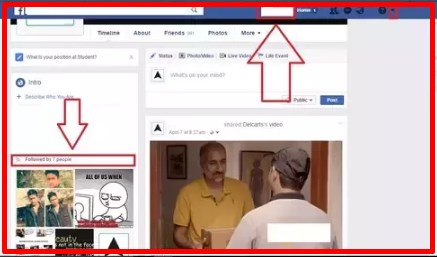
Login to your Facebook account and also most likely to your account. The 2nd arrowhead down must offer the variety of fans you have. Occasionally it's missing out on. So go on to following the steps.

Facebook Followers

STEP 2:
Click the fall switch received the image listed below.

Facebook Followers

STEP 3:
It ought to offer you something like the picture listed below. Currently, click Setups as revealed following.

Facebook Followers

STEP 4:
After clicking setups, a web page something similar to this will indeed turn up. Currently, click Public Posts. As revealed listed below.

Facebook Followers
STEP 5:
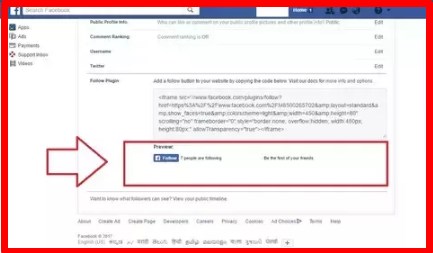
After action 4, you ought to have something similar to this before you. In the picture revealed Listed below, inside the red box location you could locate your Magic fans number before your name.

Facebook Followers

I wish this assists. Many thanks for the analysis.

See: Facebook Logout My Account 2017

Read More
  • Share This:  
  •  Facebook
  •  Twitter
  •  Google+
  •  Stumble
  •  Digg

How to See Your Pokes On Facebook

 Access Facebook, Account, Admin Facebook Group, Android, App, Following Me, Name, What is Facebook Spaces     No comments   

How to See Your Pokes On Facebook - Facebook's "poke" function allows people get the attention of others in its own unique ways. For lots of us, poking someone on Facebook was considered a form of harmless flirtation, and an expression of interest, just like swiping precisely on Tinder -- the person you've Poked will understand you have an interest in some way, however absolutely nothing past that. They could react and they may not. But, no matter what, poking was a guaranteed means for a user to let their intensions of interest be understood!

Recommended:
  • Can You See who Looks at Your Facebook Profile
  • Have you deleted your Old Facebook account?
  • Follow me is the new Facebook hoax

As Facebook expanded, the poking feature ended up being a lot more irritating than useful, until the Facebook "poke" got to a practically ironic, cutesy stage, where users would certainly "poke" each other for being amusing. While we don't know exactly what sort of social standing poking somebody holds these days, we can tell you that the poking feature has been relegated to the world of Facebook apps, which lots of people seldom check.

See: Who Unfriended Me On Facebook App

How To See Your Pokes On Facebook

Two Ways to Check Your Facebook Pokes
If you're looking to check your Facebook Pokes, the first option is to open the Facebook app, and also go all the way to the bottom of the screen, where you could click the "More" button. Then, go to the "Application" button, as well as click once more. Unless Pokes is among your most frequently used applications, this is where it will show up. If you have the tendency to make use of the app regularly, it may appear on the list of alternatives when you originally click "more button," perhaps even appearing beside Facebook's more bookmarked applications now, "On This particular day."

Once discovered, click the Pokes app, and also there you are-- you'll have the ability to see those that has Poked you just recently, which you have actually Poked, and also Facebook's suggestions for  those that you should poke! For example, if you look at a friend's page often, the Poke app will possibly recommend you give this person a quick "poke.".

The 2nd method to check your Pokes is to merely go to the search bar on top of the Facebook Mobile application, and also type in "Pokes." This should take you to the application itself, which will certainly offer you the same options as the method explained above.


How To See Your Pokes On Facebook Via browser

To see your Facebook pokes right away, simply go to this link www.facebook.com/pokes and you'll see all pokes received by you... all recommended pokes, etc... 


Don't Poke an Eye Out!

Have you been poking anybody recently? While some customers may discover this Facebook feature downright ridiculous, others may still find it adorable, or even flirtatious! Do you wish to learn where you stand in the world of Facebook Pokes? Let us know your thoughts in the comment box shown below, as well as see exactly what various other users are thinking!

See: Following Me Facebook Latest Hoax
Read More
  • Share This:  
  •  Facebook
  •  Twitter
  •  Google+
  •  Stumble
  •  Digg

How to See Your Pokes On Facebook

 Access Facebook, Account, Admin Facebook Group, Android, App, Following Me, Name, What is Facebook Spaces     No comments   

Facebook's "poke" function allowed individuals obtain the focus of others in its own unique means. For lots of us, poking someone on Facebook was considered a form of harmless flirtation, and an expression of interest, just like swiping precisely Tinder-- the person you've Poked will understand you have an interest in some way, however absolutely nothing past that. They could react, they may not. But, no matter, poking was a guaranteed means for a user to let their rate of interest be understood!
As Facebook expanded, the poking feature ended up being a lot more irritating than useful, until the Facebook "poke" got to a practically ironic, cutesy stage, where individuals would certainly "poke" each other for being amusing. While we don't know exactly what sort of social standing poking somebody holds these days, we can tell you that the poking feature has been relegated to the world of Facebook apps, which lots of people seldom check.

See: Who Unfriended Me On Facebook App

How To See Your Pokes On FacebookTwo Ways to Inspect Your Pokes
If you're looking to inspect your Facebook Pokes, the first option is to open the Facebook app, and also go all the way to the bottom of the screen, where you could click the "Even more" button. Then, go to the "Application" switch, as well as click once more. Unless Pokes is among your more frequently utilized applications, this is where it will show up. If you have the tendency to make use of the app regularly, it may appear on the list of alternatives when you originally click "A lot more," perhaps even appearing beside among Facebook's more favored applications now, "On This particular day."

Once discovered, click the Pokes app, and also there you are-- you'll have the ability to see that has Poked you just recently, which you have actually Poked, and also Facebook's suggestions for that you must poke! For example, if you look at a friend's page often, the Poke app will possibly recommend you provide this person a quick "poke.".

The 2nd method to check your Pokes is to merely go to the search bar on top of the Facebook Mobile application, and also key in "Pokes." This should take you to the application itself, which will certainly offer you the same choices as the method explained above.

Don't Poke an Eye Out!

Have you been poking anybody recently? While some customers may discover this Facebook function downright ridiculous, others may still find it adorable, or even flirtatious! Do you wish to learn where you stand in the world of Facebook Pokes? Let us know your thoughts in the remarks listed below, as well as see exactly what various other individuals are thinking!

See: Following Me Facebook Latest Hoax


Read More
  • Share This:  
  •  Facebook
  •  Twitter
  •  Google+
  •  Stumble
  •  Digg
Older Posts Home

Blog Archive

  • ▼  2019 (502)
    • ▼  July (5)
      • ▼  Jul 08 (2)
        • Selling Things On Facebook - Sell Items On Faceboo...
        • Marketplace App For Facebook - How does Facebook ...
      • ►  Jul 07 (2)
      • ►  Jul 06 (1)
    • ►  February (368)
      • ►  Feb 12 (33)
      • ►  Feb 11 (21)
      • ►  Feb 09 (37)
      • ►  Feb 08 (40)
      • ►  Feb 07 (45)
      • ►  Feb 06 (40)
      • ►  Feb 05 (23)
      • ►  Feb 04 (49)
      • ►  Feb 02 (25)
      • ►  Feb 01 (55)
    • ►  January (129)
      • ►  Jan 31 (78)
      • ►  Jan 30 (20)
      • ►  Jan 29 (11)
      • ►  Jan 20 (4)
      • ►  Jan 19 (3)
      • ►  Jan 18 (4)
      • ►  Jan 17 (5)
      • ►  Jan 16 (1)
      • ►  Jan 12 (1)
      • ►  Jan 11 (1)
      • ►  Jan 10 (1)
  • ►  2018 (2464)
    • ►  November (64)
      • ►  Nov 25 (4)
      • ►  Nov 24 (4)
      • ►  Nov 23 (7)
      • ►  Nov 22 (9)
      • ►  Nov 21 (11)
      • ►  Nov 19 (14)
      • ►  Nov 15 (7)
      • ►  Nov 03 (6)
      • ►  Nov 01 (2)
    • ►  October (178)
      • ►  Oct 31 (9)
      • ►  Oct 30 (1)
      • ►  Oct 26 (1)
      • ►  Oct 24 (16)
      • ►  Oct 23 (21)
      • ►  Oct 22 (26)
      • ►  Oct 19 (5)
      • ►  Oct 16 (50)
      • ►  Oct 15 (36)
      • ►  Oct 14 (12)
      • ►  Oct 13 (1)
    • ►  September (770)
      • ►  Sep 27 (58)
      • ►  Sep 26 (50)
      • ►  Sep 25 (70)
      • ►  Sep 24 (70)
      • ►  Sep 20 (50)
      • ►  Sep 19 (79)
      • ►  Sep 18 (50)
      • ►  Sep 17 (43)
      • ►  Sep 14 (81)
      • ►  Sep 13 (39)
      • ►  Sep 12 (101)
      • ►  Sep 11 (69)
      • ►  Sep 10 (9)
      • ►  Sep 09 (1)
    • ►  June (215)
      • ►  Jun 07 (13)
      • ►  Jun 06 (5)
      • ►  Jun 05 (48)
      • ►  Jun 04 (49)
      • ►  Jun 03 (50)
      • ►  Jun 02 (50)
    • ►  May (1205)
      • ►  May 30 (50)
      • ►  May 29 (50)
      • ►  May 28 (43)
      • ►  May 26 (50)
      • ►  May 25 (50)
      • ►  May 24 (50)
      • ►  May 23 (50)
      • ►  May 21 (50)
      • ►  May 20 (100)
      • ►  May 18 (92)
      • ►  May 17 (98)
      • ►  May 16 (93)
      • ►  May 15 (25)
      • ►  May 14 (25)
      • ►  May 13 (90)
      • ►  May 12 (25)
      • ►  May 11 (50)
      • ►  May 09 (25)
      • ►  May 08 (25)
      • ►  May 07 (32)
      • ►  May 06 (21)
      • ►  May 05 (18)
      • ►  May 04 (25)
      • ►  May 03 (18)
      • ►  May 02 (25)
      • ►  May 01 (25)
    • ►  April (26)
      • ►  Apr 12 (25)
      • ►  Apr 10 (1)
    • ►  March (6)
      • ►  Mar 26 (6)

Search

Copyright © Make Over Arena